 Banana AI
Prompts for ChatGPT Images: Templates, Examples and Ideas
Prompts for ChatGPT images that work: a reusable template, edit formulas, and ready-to-paste examples for portraits, hairstyles, cartoons and funny photos.
Prompts for ChatGPT images are short written instructions that tell the model what picture to create or how to edit a photo you upload. A useful formula is subject + style + setting + lighting + composition for new images, and “change only X, keep Y unchanged” for edits. Then refine with one small change per follow-up message.
This guide gives you a reusable template, the edit structure that helps keep faces and backgrounds intact, and ready-to-paste examples for portraits, hairstyles, cartoon figures and funny pictures.
What makes a good ChatGPT image prompt?
A good prompt is specific about five things: who or what is in the picture, the visual style, where it takes place, how it is lit, and how it is framed. A third-party prompt library on gradually.ai uses a generation structure like this, plus a separate pattern for editing existing photos.
Vague prompts like “make me look cool” leave every decision to the model. Concrete prompts like “rainy street at night, neon signs blurred behind, 85mm lens, shallow depth of field” (our own example, not from the source) give it something to aim for, and they make the result easier to judge.
What is a simple ChatGPT image prompt template?
Use this fill-in structure for new images:
- Subject: who or what, with one or two defining details (age range, outfit, expression, pose)
- Style: photo, oil painting, 3D figure, anime, watercolor, film photo
- Setting: a specific place and time of day
- Lighting: window light, golden hour, studio softbox, neon, candlelight
- Composition: close-up, half body, full body, eye level, low angle, lens and depth of field
- Constraints: what to avoid, such as “no text, logos or watermarks”
The gradually.ai prompt list builds “no text, logos or extra objects” into its edit template, so a constraint line is worth adding.
What’s a good prompt for ChatGPT to edit a picture?
A good edit prompt starts with “Edit this image”, names the one thing to change, and lists everything that should stay the same. According to gradually.ai, the template works like this:
- Say “Edit this image”.
- Change only a named object or area.
- List what to keep unchanged: subject, composition, lighting, background.
- Describe the result you want.
- Add “no text, logos or extra objects”.
Two specific edit types come up constantly:
- Adding objects: describe position, size and light source. The same page gives the example of adding small floating crystals while keeping the subject, camera angle and background unchanged.
- Background swaps: name the new setting and ask to keep the person or product. It is worth checking the result closely around hair, edges, reflections and shadows.
For portraits of yourself, you can add “keep the face and identity unchanged” and check the result closely.
Prompt patterns at a glance
| Pattern | When to use it | Key phrase |
|---|---|---|
| Generate | New image from scratch | Subject + style + setting + lighting + composition |
| Edit | Change part of an uploaded photo | ”Change only X, keep Y unchanged” |
| Iterate | Fixing a result you mostly like | One change per follow-up |
| Constrain | Removing unwanted extras | ”No text, logos or extra objects” |
These patterns are based on the gradually.ai prompt library. Treat them as a way to write clear, specific sentences.
ChatGPT image prompts for portraits
Portrait prompts can borrow the language of photography: lens length, aperture, light direction and color grade. Useful terms include “85mm lens”, “f/1.8”, “shallow depth of field”, “shot on 35mm film”, “overhead softbox”, “rim light” and “low angle”.
Cinematic street portrait
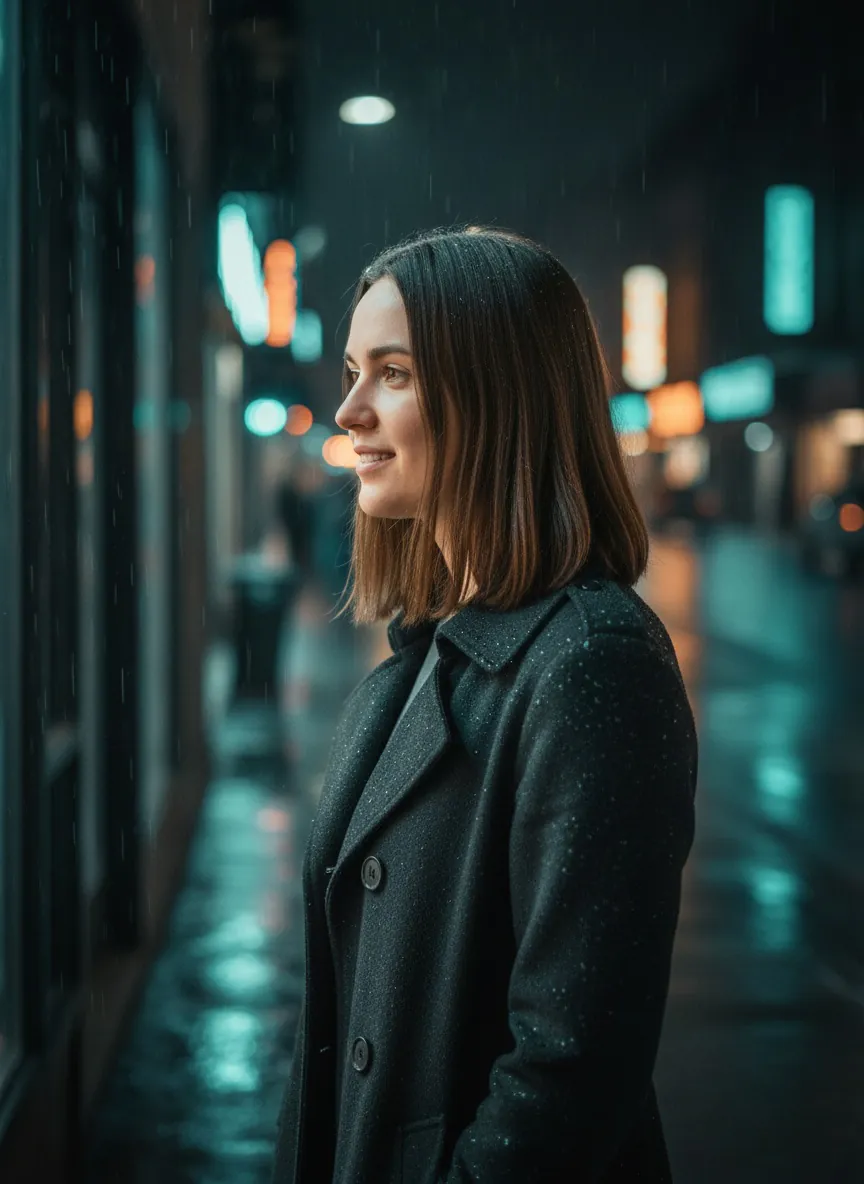
This edit keeps the person from the uploaded photo and moves her into a moody night scene. Notice how lighting and lens details do most of the work.
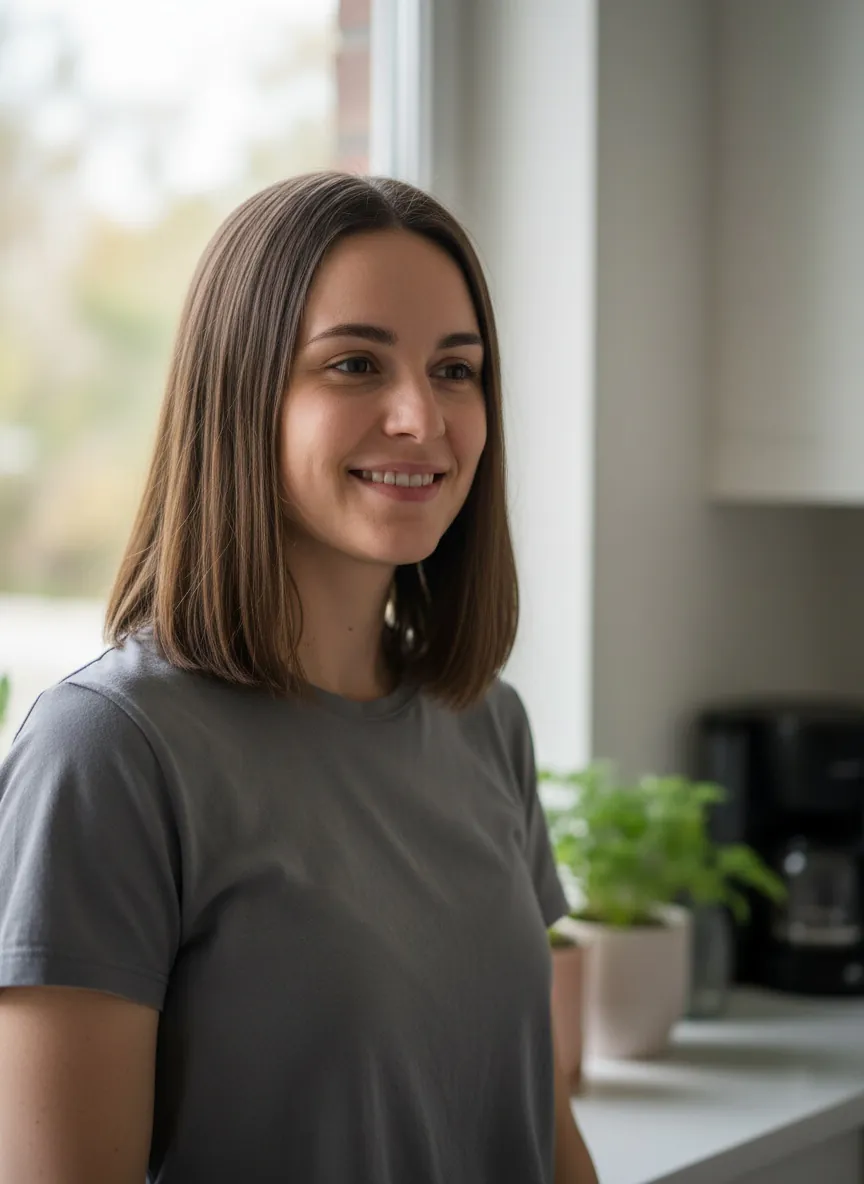 Input photo
 Result
Example 1Made with Nano Banana in Banana AI
Cinematic street portrait
Turn this photo into a cinematic portrait of the person in this photo. Keep the face, identity and hairstyle unchanged. Place her on a rainy city street at night, wearing a dark wool coat, with neon shop signs blurred behind her. Soft side light from a storefront, light rain on her shoulders, shot on an 85mm lens at f/1.8, shallow depth of field, muted teal and amber colors. No text or logos.
Lens, light direction and color grade turn a kitchen snapshot into a film still.
Adapt this example to your own photo and add the face-lock line for edits.
How do you try a new hairstyle with ChatGPT?
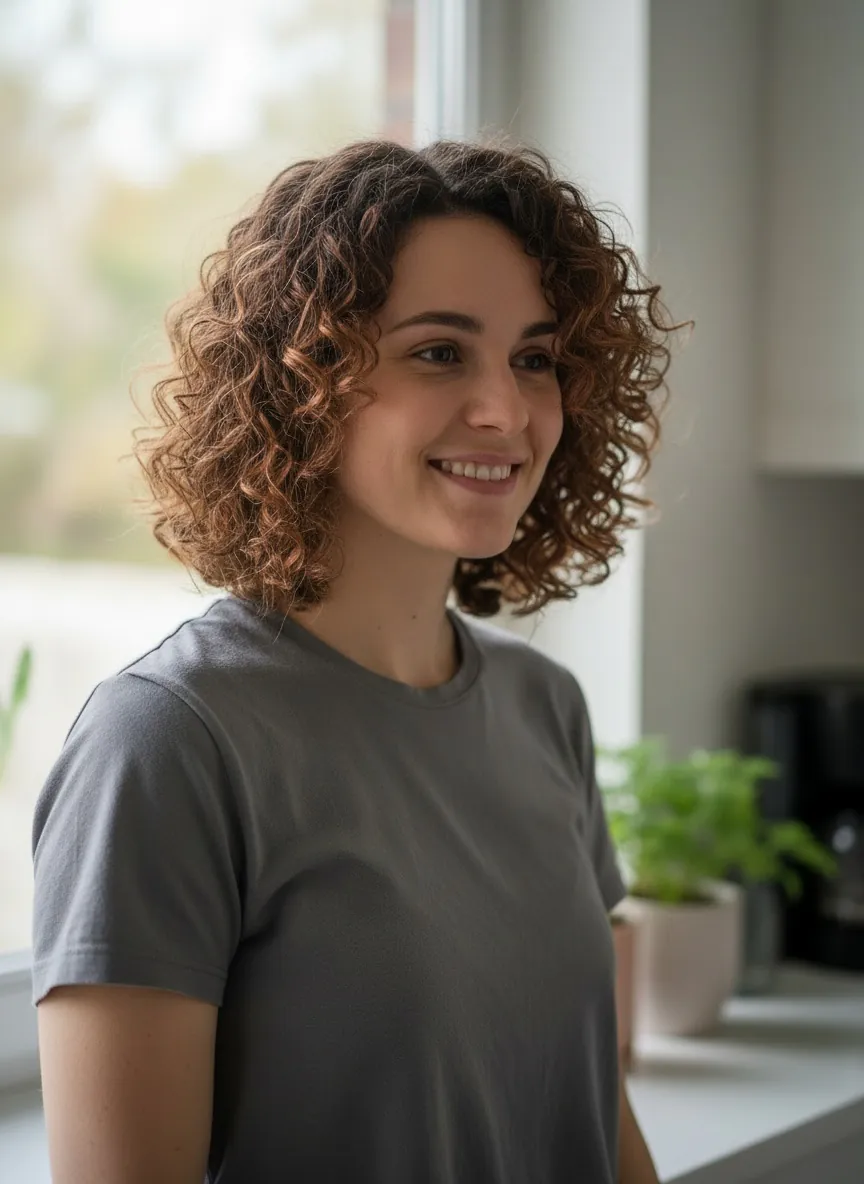
Upload a clear, front-facing photo and use the edit structure: change only the hair, keep everything else. Mention texture, length and color, and ask for shadows that match the existing light so the new hair does not look stuck on.
Hairstyle try-on
Input photo
 Result
Example 2Made with Nano Banana in Banana AI
Hairstyle try-on
Edit this photo: change only the hairstyle of the person in this photo to a chin-length curly bob with soft copper highlights. Keep the face, identity, expression, clothing, pose, lighting and background exactly the same. Make the hair look natural, with realistic strands around the ears and forehead and shadows that match the window light. No text, logos or extra objects.
The 'change only X, keep Y' structure keeps everything except the hair.
To compare several cuts, keep the prompt identical and swap only the hairstyle description in each follow-up. That way any difference you see is more likely to come from the haircut than from a changed background or pose.
How do you make cartoon and toy-style images?
Describe the target style as a physical object or a named art medium, and keep the face recognizable. The gradually.ai list includes collectible-figure and action-figure styles, Polaroid effects, interior redesigns, object additions and background swaps among its categories.
Collectible figure in a display box
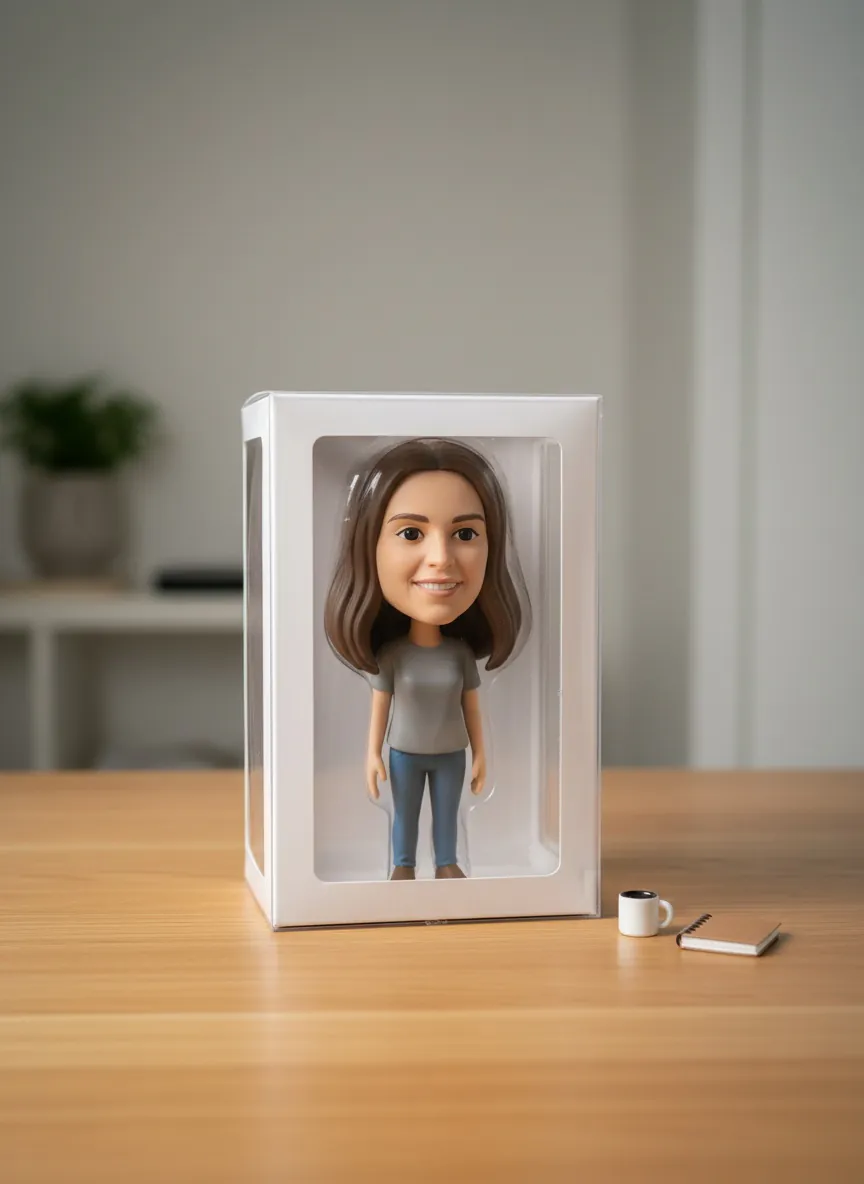
This is a generic version of the toy-figure trend, with plain packaging and no brand names.
Input photo
 Result
Example 3Made with Nano Banana in Banana AI
Collectible figure in a display box
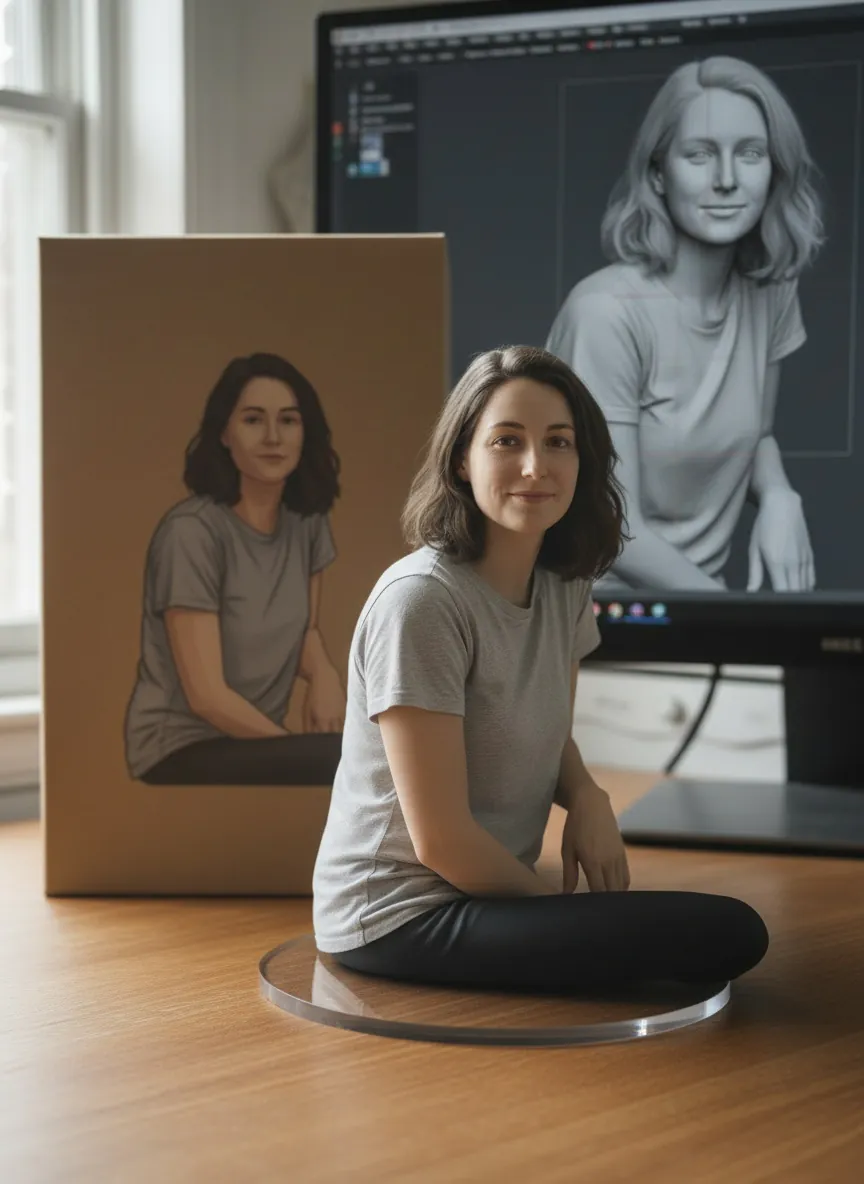
Turn the person in this photo into a stylized 3D vinyl collectible figure with an oversized head and small body, keeping the face recognizable and identity unchanged, with the same hair color and gray t-shirt. Place the figure inside a clear plastic display box on a wooden desk, soft studio lighting, with a tiny coffee mug and sketchbook beside it. Plain packaging with no text, brand names or logos.
A generic take on the toy-figure trend, with plain unbranded packaging.
For other stylized looks, Banana AI has preset styles, such as the photo to anime converter and the AI Polaroid photo generator, if you prefer not to write the prompt yourself.
Funny and fun ChatGPT image prompt ideas
Funny prompts usually come from contrast: a serious style applied to a silly subject, or an everyday subject in an absurdly formal setting. Keep the description just as concrete as a portrait prompt, because the joke lands only if the image looks deliberate.
Pet as a museum portrait
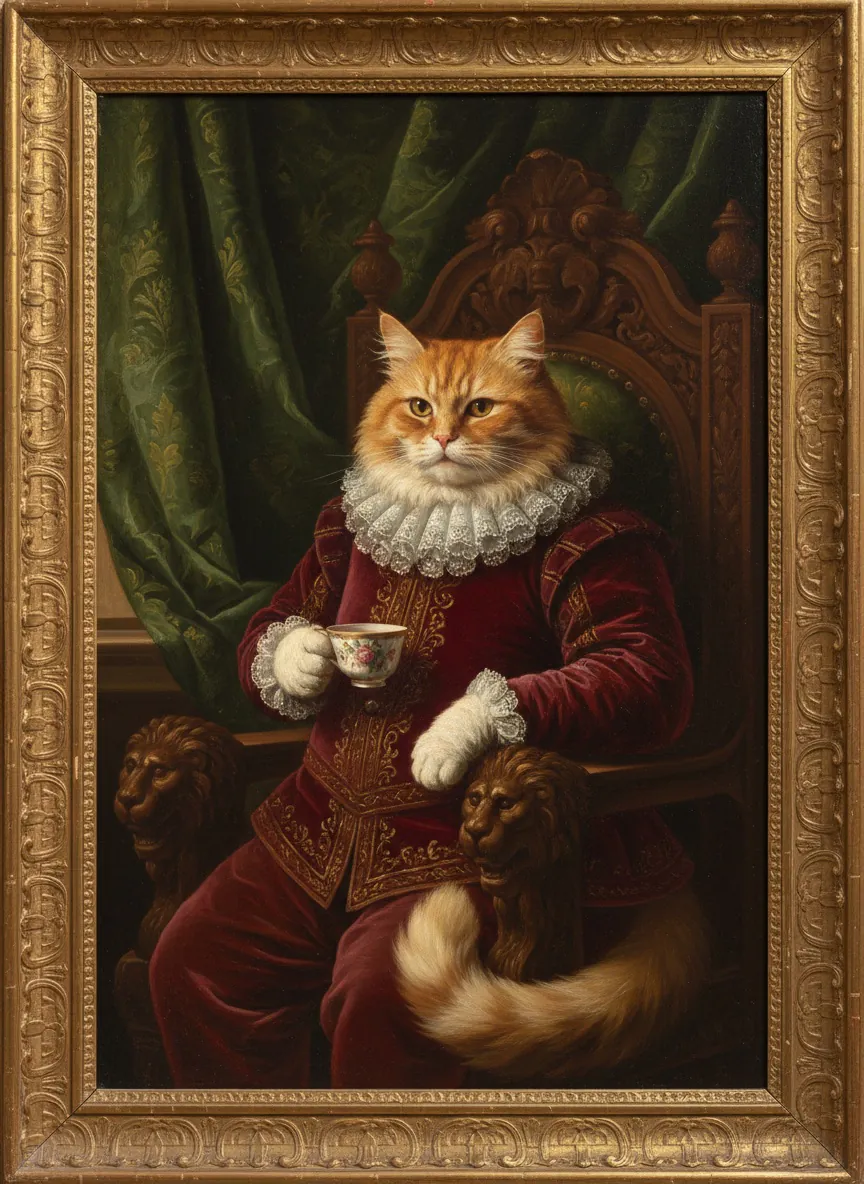
This one is a text prompt, so no photo is needed.
 AI image
Example 4Made with Nano Banana in Banana AI
Cat as a museum portrait
A serious oil painting in the style of an old museum portrait showing a fluffy orange cat dressed as a Renaissance nobleman, wearing a velvet doublet and lace collar, sitting on a carved wooden throne and holding a tiny teacup in one paw. Dramatic window light from the left, dark green curtain background, gilded frame visible at the edges, rich warm colors, fine brushstroke texture.
Funny prompts work through contrast: a formal style applied to a silly subject.
More ideas that follow the same contrast rule:
- Your desk plant photographed like a luxury perfume ad
- A houseplant receiving an award on a red carpet
- Your morning coffee as a dramatic movie poster with no text
- A grocery receipt displayed in a museum glass case
- Yourself as a tiny figure standing on your own keyboard
For more viral formats, see our guide to Nano Banana trending prompts.
How do you iterate without ruining the image?
Try changing one thing per follow-up. If the lighting is right but the outfit is wrong, say “keep everything the same, change only the jacket to a cream trench coat”. Small, single changes make it easier to see what each instruction did.
A short checklist after each result:
- Is the face still the same person?
- Do hair edges and shoulders blend into the background?
- Do shadows and reflections match the light source?
- Did any stray text, logos or extra objects appear?
Where can you run these prompts besides ChatGPT?
Because these prompts are plain language, you could try them in other image models too, though results will differ. The Banana AI mobile app includes GPT Image 2 by OpenAI alongside Nano Banana, Nano Banana 2 and Nano Banana Pro by Google and Grok Imagine by xAI, so you can run the same prompt on several models and compare. The web app at app.getbanana.ai offers the Nano Banana models and Grok Imagine, supports up to 8 reference images per edit, and starts at $19/month with credits. There is no free tier on the web.
If you already use ChatGPT, you can paste these prompts there. Model names, limits and quotas change, so check OpenAI’s own help pages for current details.
What we noticed testing these prompts
- All four examples worked on the first attempt, and the log shows no rejected attempts, so there were no retries to learn from here.
- The three photo-based prompts (street portrait, hairstyle try-on, collectible figure) each told the model to keep the face and identity unchanged. The reviewer saw a recognizable woman with brown hair in every result.
- The hairstyle try-on asked to change only the hairstyle, and the result showed the requested chin-length curly look with copper highlights while the setting was a sunlit window with a plant.
- The text-only cat prompt was specific about style, costume and clothing, and the result matched: an oil portrait of an orange cat in a red velvet doublet and lace ruff, in a gilded frame. All four ran on Nano Banana, so the log says nothing about other models.
Banana AI
Try these prompts in the Banana AI app
Upload a selfie, paste any prompt from this guide and pick Nano Banana, GPT Image or Grok. The app also turns your photos into AI videos and viral effects.
On a computer? Use Banana AI in your browser →
4.8 on the App Store from 180 ratings
FAQ
What is the best prompt format for ChatGPT images?
+
Combine subject, style, setting, lighting and composition, then add what to avoid, such as text or logos. For edits, use 'change only X, keep Y unchanged'. There is no single best prompt, only clearer and vaguer ones.
How do I keep my face the same when editing a photo?
+
Try writing 'keep the face and identity unchanged' near the start of the prompt and limit the edit to one area. Also list the parts that should stay the same, like pose, lighting and background. If the face drifts, you can repeat the instruction in a follow-up.
Are there special commands for ChatGPT image generation?
+
The source prompt library relies on plain, specific sentences. Phrases like 'Edit this image' or 'no text or logos' are written as clear instructions.
What camera terms help portrait prompts?
+
Lens length (35mm, 85mm), aperture (f/1.8), shallow depth of field, light direction (side light, rim light, softbox) and film stock or color grade are common photography terms you can try. They give the model concrete visual targets instead of vague mood words.
Do ChatGPT image prompts work in other AI tools?
+
You can try them elsewhere, since they are plain language, but results will differ between models. Nano Banana, Grok Imagine and GPT Image 2 are all available in the Banana AI mobile app, so you can compare a few.